若有任何問題請來信:gss_crm@gss.com.tw
[Design Pattern]這可能是你第一個接觸到的Design Pattern

簡介
這次要跟大家介紹的是Composite Pattern,這是GoF(Gang of Four)經典的23種設計模式之一,GoF把設計模式分為三種:
- Creational Patterns
- Structural Patterns
- Behavioral Patterns
Composite Pattern被歸類在Structural Patterns,這類設計模式著重在類別及物件的組合,形成更龐雜的結構,從而實現新的功能。
Composite pattern 的官方定義:
將物件(objects)組合(compose)成樹狀結構以表示part-whole hierarchies(可參見文末連結,此處不贅述),這使客戶(clients)能夠一致地(uniformly)對待單個物件和物件的組合。
大家熟悉的檔案系統就是一種Composite pattern的實現,我們進入檔案系統基本上只會看到資料夾(Directory)和檔案(file)這兩種物件,一個資料夾可以包含任意數量的檔案或是資料夾,這麼一來就形成了樹狀的結構,而我們都可以對其進行刪除或是重新命名的動作,這就是定義所說的一致性對待。只要遇到階層或是樹狀的結構都可以評估看看是否需要套用Composite pattern。
實作
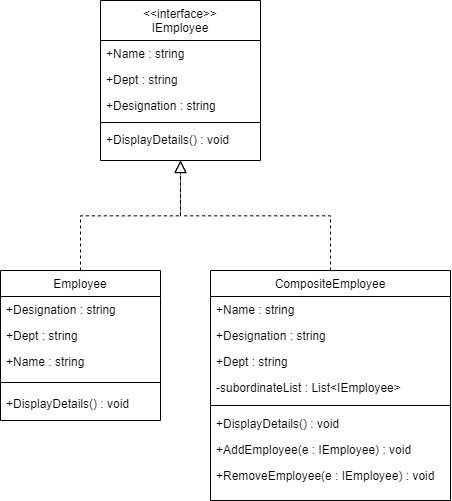
此範例是採用C#實作簡易版的公司職員管理,下圖為UML類別圖,僅有2個類別實作1個介面。
Program.cs
using System;
using System.Collections.Generic;

namespace CompositePattern
{
    interface IEmployee
    {
        //To set an employee name
        string Name { get; set; }
        //To set an employee department
        string Dept { get; set; }
        //To set an employee designation
        string Designation { get; set; }
        //To display an employee details
        void DisplayDetails();
    }
    //Leaf Node
    class Employee : IEmployee
    {
        public string Name { get; set; }
        public string Dept { get; set; }
        public string Designation { get; set; }
        //Details of a leaf node
        public void DisplayDetails()
        {
            Console.WriteLine($"\t{Name} 隸屬於 { Dept} 頭銜:{Designation}");
        }
    }
    //Non-leaf node
    class CompositeEmployee : IEmployee
    {
        public string Name { get; set; }
        public string Dept { get; set; }
        public string Designation { get; set; }

        // 下屬容器
        private List<IEmployee> subordinateList = new List<IEmployee>();

        // 新增員工
        public void AddEmployee(IEmployee e)
        {
            subordinateList.Add(e);
        }

        // 移除員工
        public void RemoveEmployee(IEmployee e)
        {
            subordinateList.Remove(e);
        }

        //Details of a composite node
        public void DisplayDetails()
        {
            Console.WriteLine($"\n{Name} 隸屬於 {Dept} 頭銜:{Designation}");
            foreach (IEmployee e in subordinateList)
            {
                e.DisplayDetails();
            }
        }
    }

    class Program
    {
        static void Main(string[] args)
        {
            Console.WriteLine("***Composite Pattern Demo. ***");

            #region 審計委員會
            // 2名審計委員會員工
            Employee e1 = new Employee { Name = "John", Dept = "審計委員會", Designation = "工讀生" };
            Employee e2 = new Employee { Name = "Daniel", Dept = "審計委員會", Designation = "組長" };

            // 審計委員會主管
            CompositeEmployee manager1 = new CompositeEmployee { Name = "Peter", Dept = "審計委員會", Designation = "主管" };

            // 主管Peter旗下新增2名員工
            manager1.AddEmployee(e1);
            manager1.AddEmployee(e2);
            #endregion

            #region 薪酬委員會
            // 3名薪酬委員會員工
            Employee e3 = new Employee { Name = "Maggie", Dept = "薪酬委員會", Designation = "工讀生" };
            Employee e4 = new Employee { Name = "Amy", Dept = "薪酬委員會", Designation = "工讀生" };
            Employee e5 = new Employee { Name = "Allen", Dept = "薪酬委員會", Designation = "組長" };

            CompositeEmployee manager2 = new CompositeEmployee { Name = "Alex", Dept = "薪酬委員會", Designation = "主管" };

            // 主管Alex旗下新增3名員工
            manager2.AddEmployee(e3);
            manager2.AddEmployee(e4);
            manager2.AddEmployee(e5);
            #endregion

            #region 管理層頂端
            CompositeEmployee CEO = new CompositeEmployee { Name = "Tom", Dept = "董事會", Designation = "執行長" };

            // 執行長Tom旗下新增2名員工
            CEO.AddEmployee(manager1);
            CEO.AddEmployee(manager2);
            #endregion


            Console.WriteLine("\n列出完整組織員工明細:");
            CEO.DisplayDetails();

            // 移除CEO旗下的員工Peter
            CEO.RemoveEmployee(manager1);


            Console.WriteLine("\n-----------------------------------------\n");
            Console.WriteLine("\n移除Peter後的員工明細:");
            CEO.DisplayDetails();

            Console.WriteLine("\n-----------------------------------------\n");
            Console.WriteLine("\n只列出主管Alex旗下員工明細:");
            manager2.DisplayDetails();

            Console.WriteLine("\n-----------------------------------------\n");
            Console.WriteLine("\n只列出員工John的員工明細:");
            e1.DisplayDetails();

            //Wait for user
            Console.ReadKey();
        }
    }
}
程式說明
這個範例只有一個C#檔,直接複製程式碼另存為Program.cs檔並加入至Visual Studio創建的Console應用程式專案中即可運行。
main函數是C#程式運行的起始點,可以視為用戶端(client),範例中我們在其中進行了各式操作:
- 呼叫AddEmployee方法來新增員工,形成樹狀結構
- 呼叫DisplayDetails方法來顯示員工明細(for迴圈走訪樹狀結構)
- 呼叫RemoveEmployee方法,移除樹狀結構中的node(CompositeEmployee)或leaf(Employee)
整個樹狀結構中CompositeEmployee作為node,Employee作為leaf,這兩個類別共同實作了IEmployee介面,達到了一致性的對待(都可以顯示員工明細)。
part-whole hierarchies補充說明連結 https://www.open.edu/openlearn/ocw/mod/oucontent/view.php?id=82521§ion=1.3
When you subscribe to the blog, we will send you an e-mail when there are new updates on the site so you wouldn't miss them.
評論